BulkMeta: Edit Webflow Metadata Without the Page-by-Page Grind
Metadata work has a habit of showing up late.
The site looks finished. The responsive layouts work. The animations have been checked. Then someone opens the launch checklist and discovers 30 pages with unfinished titles, copied descriptions, and old social images.
None of these fixes is particularly difficult. The frustrating part is opening every page setting, finding the right field, making the change, saving it, and repeating the process.
BulkMeta was built to remove that repetition.
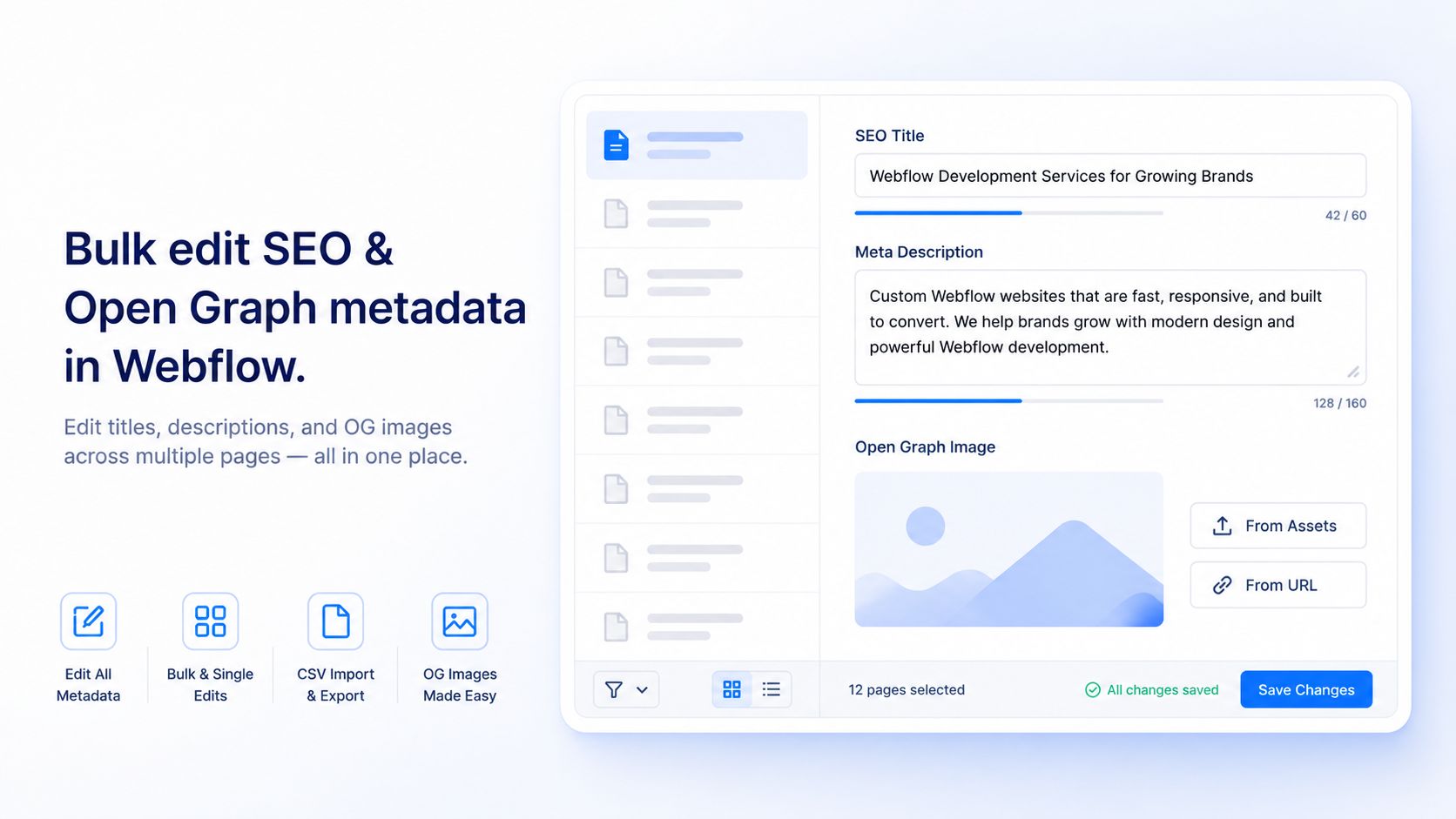
It’s a free Webflow Designer app that puts your page titles, meta descriptions, Open Graph copy, and OG images in one focused workspace. You can review the whole site, make individual changes, or update a selected group of pages without moving through Webflow’s page settings one at a time.
Webflow metadata is easy until the site gets bigger
Editing metadata for a five-page website is manageable. Editing it for a site with service pages, landing pages, case studies, legal pages, and a growing blog feels very different.
A typical cleanup goes something like this:
Open a page. Check the SEO title. Rewrite the description. Move to the Open Graph settings. Replace the image. Save. Return to the page list. Try to remember which page comes next.
That workflow creates another problem: it’s hard to see the site as a whole. Duplicate titles are easier to miss. Naming patterns drift. One service page uses the company name while the next one doesn’t. A campaign image from six months ago quietly survives on three pages.
BulkMeta brings those fields together so you can scan the site before changing anything. Search for a page, sort the list alphabetically, or group pages to make a larger project easier to inspect.
Edit one page or fix a whole group
Some pages deserve custom metadata. The homepage, major service pages, and high-value landing pages usually need individual attention.
BulkMeta supports precise, one-page editing for those cases. The page list and editing fields stay visible together, so you don’t lose your place while moving between URLs.
The bulk editor handles the repetitive work. You can select the pages that should receive an update and exclude the ones that shouldn’t. That distinction matters. A bulk tool that applies every change everywhere would create as much cleanup as it saves.
Dynamic title templates make recurring patterns easier to manage. A template using {page}, for example, can preserve each page’s name while applying a consistent title structure across the selected group.
Bulk editing still needs judgment. A good pattern for service pages may sound awkward on the About page. The sensible approach is to handle the predictable pages together, exclude the exceptions, and give important pages a separate review.
Keep SEO and social sharing in the same pass
Search metadata often gets checked before launch. Open Graph metadata gets checked after somebody shares the site and notices the wrong image.
BulkMeta puts both jobs in the same editor. Along with SEO titles and meta descriptions, you can update Open Graph titles, descriptions, and images. OG images can be selected from the Webflow asset library or added through a direct image URL.
That makes it easier to treat search results and social previews as part of the same publishing job.
BulkMeta also shows length guidance near the fields while you write. These cues are useful, but they shouldn’t turn metadata into a character-counting exercise. A clear title that describes the page is better than an awkward one written to hit an arbitrary number.
Google may create title links from several page elements and may use on-page content instead of the submitted meta description. It still recommends unique, descriptive titles and page-specific descriptions because they help explain a result to searchers. In other words, metadata influences the presentation, but it doesn’t lock Google into displaying your exact copy. Google Search Central explains the distinction here.
CSVs make client review less painful
Metadata rarely gets approved by one person.
An SEO specialist may write the first version. A client reviews brand language. A developer checks page mapping. Someone inevitably wants to work in a spreadsheet.
BulkMeta supports CSV export and import, so that review can happen without manually copying every field into a sheet. Export the current metadata, collect revisions, and import the approved version back into the app.
It’s especially handy for agencies. The client gets a familiar review format, while the person working in Webflow avoids a second round of page-by-page data entry.
Built for the awkward stage before launch
BulkMeta is useful whenever a Webflow project has accumulated enough pages to make manual metadata work annoying. Three situations stand out:
- A pre-launch review where every page needs a final title, description, and social image
- An SEO refresh where older pages have inconsistent or outdated copy
- A client handoff where metadata needs to be reviewed outside Webflow and returned in a controlled format
Updates run in the background, with save feedback shown in the same interface. You can keep working instead of waiting for each individual change to finish. The app also supports light, dark, and system themes—a small detail, but a welcome one when the cleanup takes longer than expected.
Fewer clicks, fewer forgotten pages
BulkMeta doesn’t try to turn metadata into a complicated SEO project. Its job is narrower: show the fields together, make repeated edits manageable, and help you keep track of what has been changed.
That’s the point.
Metadata probably won’t become the most enjoyable part of a Webflow build. But it can stop being a scavenger hunt through dozens of page settings.
BulkMeta is available in the Webflow marketplace, and it is free to use.